⏱ 4 മിനിറ്റ് വായിച്ചു

**സ്വകാര്യത**, **സുരക്ഷ**, **സുതാര്യത** എന്നിവയിൽ ശ്രദ്ധ കേന്ദ്രീകരിക്കുന്ന ഒരു സ്വതന്ത്ര, ഓപ്പൺ സോഴ്‌സ് ഡെസ്‌ക്‌ടോപ്പ് ബിറ്റ്‌കോയിൻ വാലറ്റാണ് സ്പാരോ. നിങ്ങളുടെ സ്വന്തം നോഡിലേക്ക് കണക്റ്റുചെയ്യാനും ഹാർഡ്‌വെയർ വാലറ്റുകൾ ഉപയോഗിക്കാനും CoinJoin-ൽ പങ്കെടുക്കാനും ഇത് നിങ്ങളെ അനുവദിക്കുന്നു.
നിങ്ങൾ ആരംഭിക്കുന്നതിന് മുമ്പ്

  • See exactly what you are signing (UTXO-level detail)
  • Connect to your own Bitcoin node for full verification
  • Built-in support for Whirlpool CoinJoin
  • Works with Ledger, Trezor, Coldcard, BitBox, and more
സ്പാരോ വാലറ്റ് സജ്ജീകരിക്കുക
0 / 5
1
ഘട്ടം 1 / 5

Download

Download
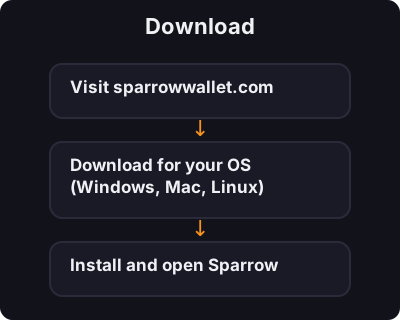
  1. Visit sparrowwallet.com
  2. Download for your OS (Windows, Mac, Linux)
  3. Install and open Sparrow
2
ഘട്ടം 2 / 5

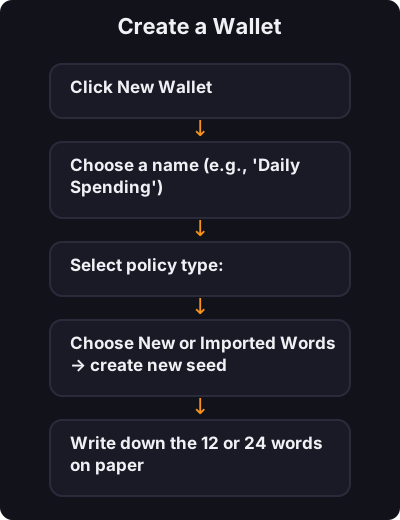
Create a Wallet

Create a Wallet
  1. Click New Wallet
  2. Choose a name (e.g., "Daily Spending")
  3. Select policy type:
    • Single Sig — one seed phrase (beginners start here)
    • Multi Sig — advanced, multiple keys required
  4. Choose New or Imported Words → create new seed
  5. Write down the 12 or 24 words on paper
  6. Set a wallet password
3
ഘട്ടം 3 / 5

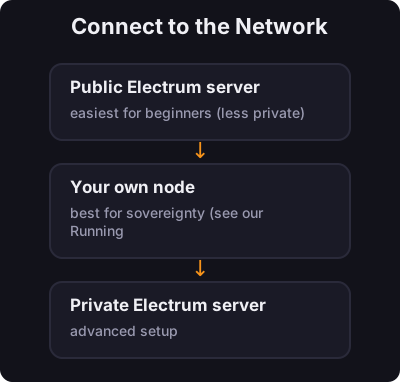
Connect to the Network

Connect to the Network

Sparrow asks how to connect:

  • Public Electrum server — easiest for beginners (less private)
  • Your own node — best for sovereignty (see our Running a Node course)
  • Private Electrum server — advanced setup
4
ഘട്ടം 4 / 5

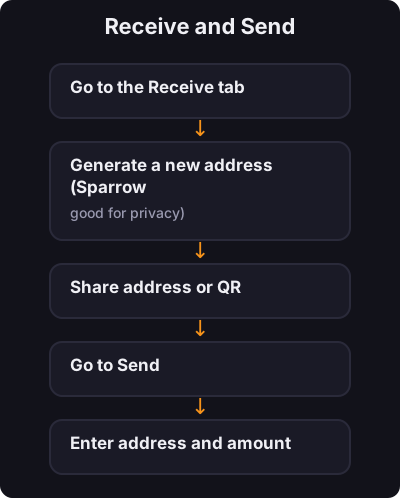
Receive and Send

Receive and Send

Receive:

  1. Go to the Receive tab
  2. Generate a new address (Sparrow encourages fresh addresses — good for privacy)
  3. Share address or QR

Send:

  1. Go to Send
  2. Enter address and amount
  3. Review the transaction details carefully
  4. Confirm
5
ഘട്ടം 5 / 5

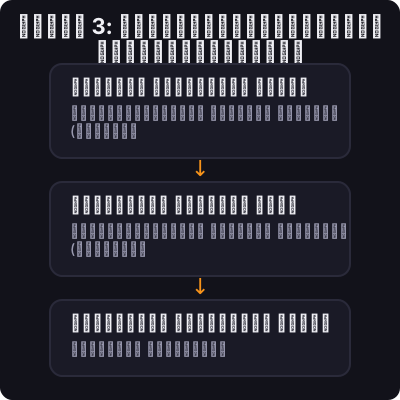
ഘട്ടം 3: നെറ്റ്‌വർക്കിലേക്ക് കണക്റ്റുചെയ്യുക

ഘട്ടം 3: നെറ്റ്‌വർക്കിലേക്ക് കണക്റ്റുചെയ്യുക

എങ്ങനെ കണക്ട് ചെയ്യണമെന്ന് സ്പാരോ ചോദിക്കുന്നു:

  • പബ്ലിക് ഇലക്‌ട്രം സെർവർ — തുടക്കക്കാർക്ക് ഏറ്റവും എളുപ്പം (കുറച്ച് സ്വകാര്യം)
  • നിങ്ങളുടെ സ്വന്തം നോഡ് - പരമാധികാരത്തിന് ഏറ്റവും മികച്ചത് (ഞങ്ങളുടെ റണ്ണിംഗ് എ നോഡ് കോഴ്‌സ് കാണുക)
  • പ്രൈവറ്റ് ഇലക്‌ട്രം സെർവർ — വിപുലമായ സജ്ജീകരണം

✅ കീ ടേക്ക്അവേ

പല ഗുരുതരമായ ബിറ്റ്‌കോയിനർമാർ ഡെസ്‌ക്‌ടോപ്പിൽ ഉപയോഗിക്കുന്ന വാലറ്റാണ് സ്പാരോ. സിംഗിൾ-സിഗ് ഉപയോഗിച്ച് ആരംഭിക്കുക, ഇൻ്റർഫേസ് പഠിക്കുക, തുടർന്ന് നിങ്ങൾ മുന്നേറുമ്പോൾ നോഡ് കണക്ഷനും സ്വകാര്യത ഉപകരണങ്ങളും പര്യവേക്ഷണം ചെയ്യുക.

← ട്യൂട്ടോറിയലുകളിലേക്ക് മടങ്ങൂ