1
Download
- Android: Search "BlueWallet" on Google Play Store
- iPhone: Search "BlueWallet" on the App Store
Only download from official app stores. Avoid APK files from unknown websites.
5 മിനിറ്റിനുള്ളിൽ നിങ്ങളുടെ ഫോണിൽ നിങ്ങളുടെ ആദ്യത്തെ ബിറ്റ്കോയിൻ വാലറ്റ് സൃഷ്ടിക്കുക.
iOS, Android എന്നിവയ്ക്കായുള്ള സൗജന്യവും ഓപ്പൺ സോഴ്സ് ബിറ്റ്കോയിൻ വാലറ്റാണ് ബ്ലൂവാലറ്റ്. ഇത് ഓൺ-ചെയിൻ ബിറ്റ്കോയിനും മിന്നൽ നെറ്റ്വർക്കിനും പിന്തുണ നൽകുന്നു.
Only download from official app stores. Avoid APK files from unknown websites.
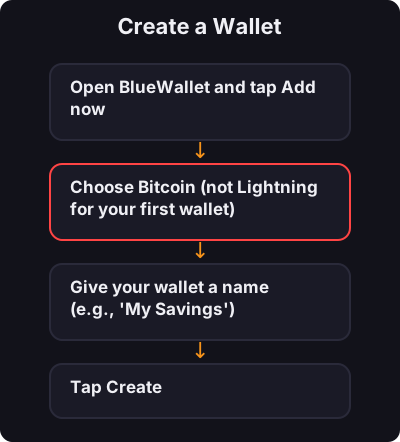
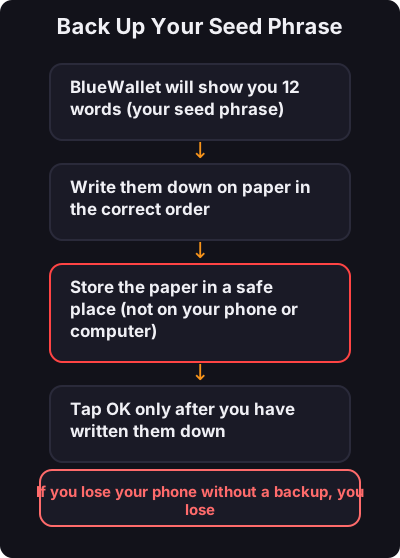
This is the most important step:
- നിങ്ങളുടെ വിത്ത് വാക്യം ഒരിക്കലും സ്ക്രീൻഷോട്ട് ചെയ്യരുത് - ആദ്യം ഒരു ചെറിയ തുക ഉപയോഗിച്ച് പരിശോധിക്കുക - ചെറിയ പ്രതിദിന പേയ്മെൻ്റുകൾക്കായി ഒരു പ്രത്യേക മിന്നൽ വാലറ്റ് പരിഗണിക്കുക