⏱ 4 ನಿಮಿಷ ಓದಿದೆ

ಸ್ಪ್ಯಾರೋ ಒಂದು ಉಚಿತ, ಓಪನ್ ಸೋರ್ಸ್ ಡೆಸ್ಕ್‌ಟಾಪ್ ಬಿಟ್‌ಕಾಯಿನ್ ವ್ಯಾಲೆಟ್ ಆಗಿದ್ದು, **ಗೌಪ್ಯತೆ**, **ಭದ್ರತೆ** ಮತ್ತು **ಪಾರದರ್ಶಕತೆ** ಮೇಲೆ ಕೇಂದ್ರೀಕೃತವಾಗಿದೆ. ಇದು ನಿಮ್ಮ ಸ್ವಂತ ನೋಡ್‌ಗೆ ಸಂಪರ್ಕಿಸಲು, ಹಾರ್ಡ್‌ವೇರ್ ವ್ಯಾಲೆಟ್‌ಗಳನ್ನು ಬಳಸಲು ಮತ್ತು CoinJoin ನಲ್ಲಿ ಭಾಗವಹಿಸಲು ನಿಮಗೆ ಅನುಮತಿಸುತ್ತದೆ.
ನೀವು ಪ್ರಾರಂಭಿಸುವ ಮೊದಲು

  • See exactly what you are signing (UTXO-level detail)
  • Connect to your own Bitcoin node for full verification
  • Built-in support for Whirlpool CoinJoin
  • Works with Ledger, Trezor, Coldcard, BitBox, and more
ಸ್ಪ್ಯಾರೋ ವಾಲೆಟ್ ಅನ್ನು ಹೊಂದಿಸಿ
0 / 5
1
ಹೆಜ್ಜೆ 1 / 5

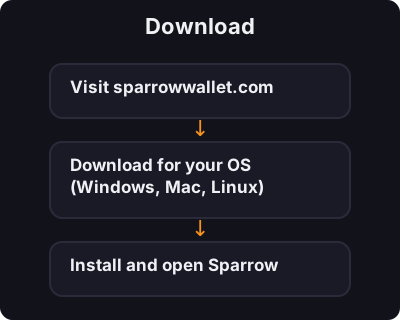
Download

Download
  1. Visit sparrowwallet.com
  2. Download for your OS (Windows, Mac, Linux)
  3. Install and open Sparrow
2
ಹೆಜ್ಜೆ 2 / 5

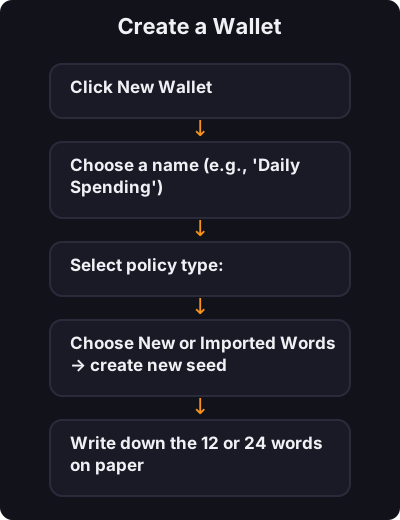
Create a Wallet

Create a Wallet
  1. Click New Wallet
  2. Choose a name (e.g., "Daily Spending")
  3. Select policy type:
    • Single Sig — one seed phrase (beginners start here)
    • Multi Sig — advanced, multiple keys required
  4. Choose New or Imported Words → create new seed
  5. Write down the 12 or 24 words on paper
  6. Set a wallet password
3
ಹೆಜ್ಜೆ 3 / 5

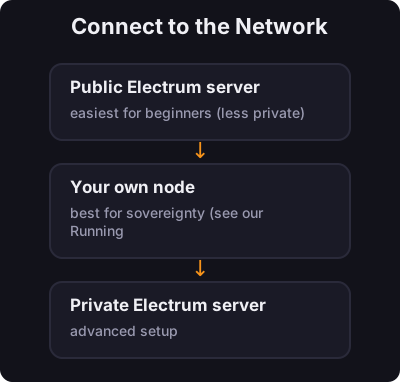
Connect to the Network

Connect to the Network

Sparrow asks how to connect:

  • Public Electrum server — easiest for beginners (less private)
  • Your own node — best for sovereignty (see our Running a Node course)
  • Private Electrum server — advanced setup
4
ಹೆಜ್ಜೆ 4 / 5

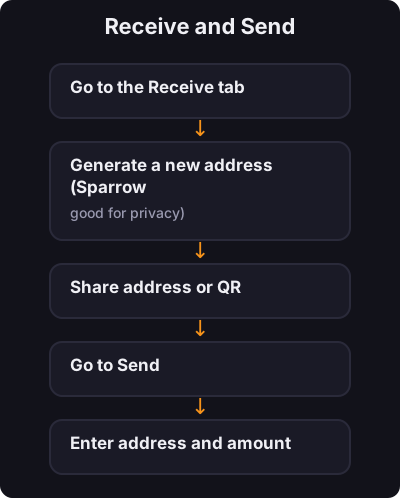
Receive and Send

Receive and Send

Receive:

  1. Go to the Receive tab
  2. Generate a new address (Sparrow encourages fresh addresses — good for privacy)
  3. Share address or QR

Send:

  1. Go to Send
  2. Enter address and amount
  3. Review the transaction details carefully
  4. Confirm
5
ಹೆಜ್ಜೆ 5 / 5

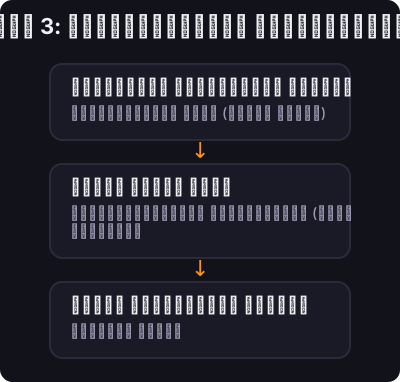
ಹಂತ 3: ನೆಟ್‌ವರ್ಕ್‌ಗೆ ಸಂಪರ್ಕಪಡಿಸಿ

ಹಂತ 3: ನೆಟ್‌ವರ್ಕ್‌ಗೆ ಸಂಪರ್ಕಪಡಿಸಿ

ಹೇಗೆ ಸಂಪರ್ಕಿಸುವುದು ಎಂದು ಗುಬ್ಬಚ್ಚಿ ಕೇಳುತ್ತದೆ:

  • ಸಾರ್ವಜನಿಕ ಎಲೆಕ್ಟ್ರಮ್ ಸರ್ವರ್ - ಆರಂಭಿಕರಿಗಾಗಿ ಸುಲಭ (ಕಡಿಮೆ ಖಾಸಗಿ)
  • ನಿಮ್ಮ ಸ್ವಂತ ನೋಡ್ — ಸಾರ್ವಭೌಮತ್ವಕ್ಕೆ ಉತ್ತಮವಾಗಿದೆ (ನಮ್ಮ ರನ್ನಿಂಗ್ ಎ ನೋಡ್ ಕೋರ್ಸ್ ಅನ್ನು ನೋಡಿ)
  • ಖಾಸಗಿ ಎಲೆಕ್ಟ್ರಮ್ ಸರ್ವರ್ — ಸುಧಾರಿತ ಸೆಟಪ್

✅ ಕೀ ಟೇಕ್ಅವೇ

ಗುಬ್ಬಚ್ಚಿಯು ಅನೇಕ ಗಂಭೀರ ಬಿಟ್‌ಕಾಯಿನರ್‌ಗಳು ಡೆಸ್ಕ್‌ಟಾಪ್‌ನಲ್ಲಿ ಬಳಸುವ ವ್ಯಾಲೆಟ್ ಆಗಿದೆ. ಸಿಂಗಲ್-ಸಿಗ್‌ನೊಂದಿಗೆ ಪ್ರಾರಂಭಿಸಿ, ಇಂಟರ್ಫೇಸ್ ಅನ್ನು ಕಲಿಯಿರಿ, ನಂತರ ನೀವು ಮುಂದುವರಿದಂತೆ ನೋಡ್ ಸಂಪರ್ಕ ಮತ್ತು ಗೌಪ್ಯತೆ ಪರಿಕರಗಳನ್ನು ಅನ್ವೇಷಿಸಿ.

← ಟ್ಯುಟೋರಿಯಲ್‌ಗೆ ಹಿಂತಿರುಗಿ