1
Download
- Android: Search "BlueWallet" on Google Play Store
- iPhone: Search "BlueWallet" on the App Store
Only download from official app stores. Avoid APK files from unknown websites.
5 ನಿಮಿಷಗಳಲ್ಲಿ ನಿಮ್ಮ ಫೋನ್ನಲ್ಲಿ ನಿಮ್ಮ ಮೊದಲ ಬಿಟ್ಕಾಯಿನ್ ವ್ಯಾಲೆಟ್ ಅನ್ನು ರಚಿಸಿ.
ಬ್ಲೂವಾಲೆಟ್ ಐಒಎಸ್ ಮತ್ತು ಆಂಡ್ರಾಯ್ಡ್ಗಾಗಿ ಉಚಿತ, ತೆರೆದ ಮೂಲ ಬಿಟ್ಕಾಯಿನ್ ವ್ಯಾಲೆಟ್ ಆಗಿದೆ. ಇದು ಆನ್-ಚೈನ್ ಬಿಟ್ಕಾಯಿನ್ ಮತ್ತು ಲೈಟ್ನಿಂಗ್ ನೆಟ್ವರ್ಕ್ ಎರಡನ್ನೂ ಬೆಂಬಲಿಸುತ್ತದೆ.
Only download from official app stores. Avoid APK files from unknown websites.
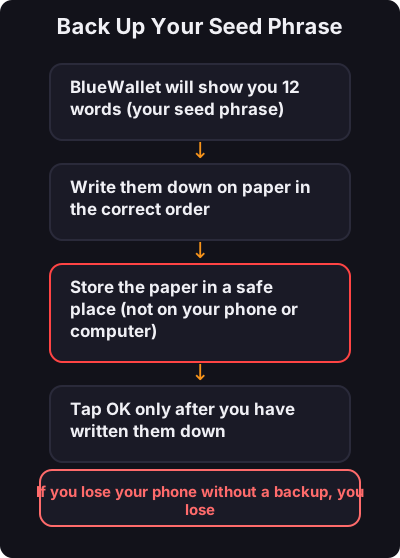
This is the most important step:
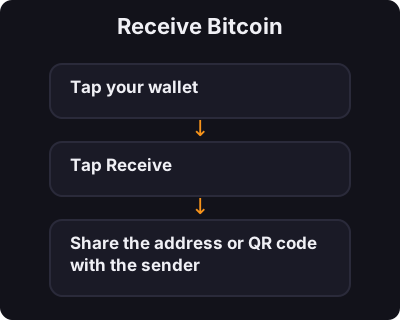
- ನಿಮ್ಮ ಬೀಜ ಪದಗುಚ್ಛವನ್ನು ಎಂದಿಗೂ ಸ್ಕ್ರೀನ್ಶಾಟ್ ಮಾಡಬೇಡಿ - ಮೊದಲು ಸಣ್ಣ ಪ್ರಮಾಣದಲ್ಲಿ ಪರೀಕ್ಷಿಸಿ - ಸಣ್ಣ ದೈನಂದಿನ ಪಾವತಿಗಳಿಗಾಗಿ ಪ್ರತ್ಯೇಕ ಲೈಟ್ನಿಂಗ್ ವ್ಯಾಲೆಟ್ ಅನ್ನು ಪರಿಗಣಿಸಿ