1
Download
- Android: Search "BlueWallet" on Google Play Store
- iPhone: Search "BlueWallet" on the App Store
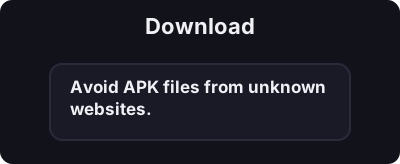
Only download from official app stores. Avoid APK files from unknown websites.
5 মিনিটের মধ্যে আপনার ফোনে আপনার প্রথম বিটকয়েন ওয়ালেট তৈরি করুন।
BlueWallet iOS এবং Android এর জন্য একটি বিনামূল্যের, ওপেন সোর্স বিটকয়েন ওয়ালেট। এটি অন-চেইন বিটকয়েন এবং লাইটনিং নেটওয়ার্ক উভয়কেই সমর্থন করে।
Only download from official app stores. Avoid APK files from unknown websites.
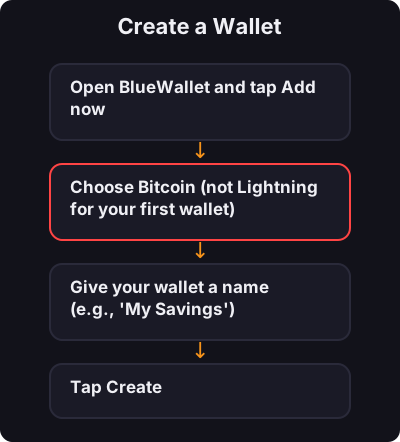
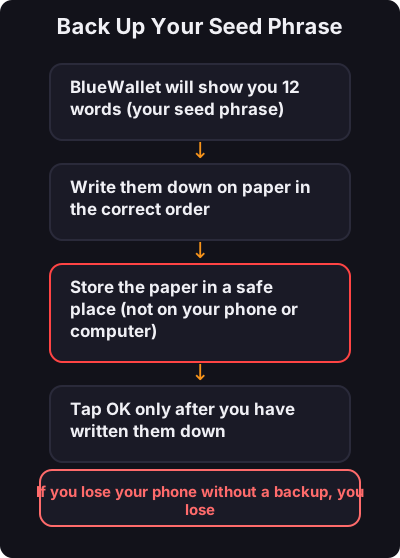
This is the most important step:
- কখনই আপনার বীজ বাক্যাংশের স্ক্রিনশট করবেন না - প্রথমে অল্প পরিমাণে পরীক্ষা করুন - ছোট দৈনিক পেমেন্টের জন্য একটি পৃথক লাইটনিং ওয়ালেট বিবেচনা করুন